Progressive overload that runs itself
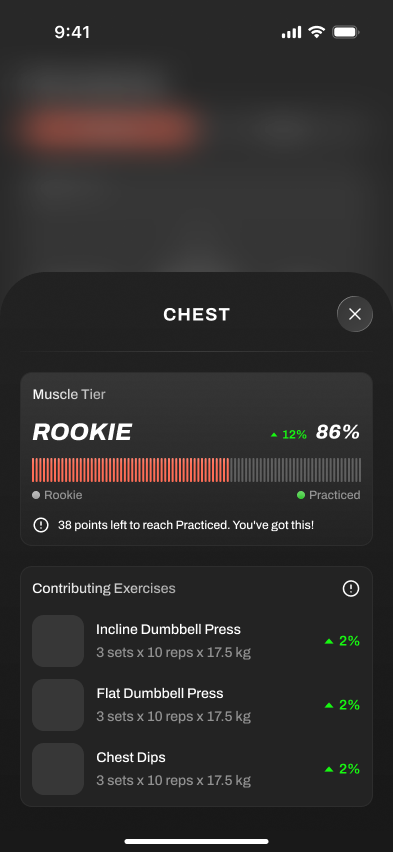
Brace AI tracks your logged sets and adjusts load and rep targets so progression is easier to manage without spreadsheets.
Short answer
Progressive overload is the one rule strength training cannot do without: to get stronger, you have to ask your body to do a little more over time. Brace AI handles the math, watches what you lift, and nudges the next session forward at a pace you can recover from.
Last reviewed June 2026. We judge this workflow by whether it helps during actual training: starting the session, logging cleanly, keeping momentum between sets, and turning the workout history into better next-session decisions.
How automatic progression works
- 01
Log your sets
Weight, reps, and effort are captured every session, by muscle group.
- 02
Measure the trend
The app compares this session to your recent history, not a fixed plan.
- 03
Adjust the next load
Lifts that moved well get more; lifts that stalled hold or change.
- 04
Back off when needed
When performance stalls, the coach can explain when to hold, reduce, or rebuild instead of forcing the next jump.
Why automatic overload beats a fixed plan
Progress you can see
Volume and strength trends per muscle group, so you know exactly what is moving.
Effort-aware
Targets respond to how hard a set felt, not just whether you finished it.
Recovery in the loop
Back-off guidance is part of the coach flow, so stalls are not treated as simple failures.
PRs that count
Personal records are surfaced the moment you hit them, across reps and load.
Automatic progression versus a spreadsheet
A linear spreadsheet adds the same amount every week until it breaks. Your body does not work on a fixed slope.
Doing it manually
- Add 2.5kg every week regardless of how it felt
- No signal until a lift stalls hard
- Back-off decisions are an afterthought, if at all
- Per-muscle balance is invisible
With Brace AI
- Increments sized to your recent performance
- Stalls caught early from effort and rep data
- Back-off guidance when fatigue piles up
- Volume balanced across muscle groups
Where it helps
What changes before, during, and after training
The point of this feature is not to add another screen to manage. It should make the workout easier to start, faster to log, and clearer to review once the session is over. That is why we judge it by the full training loop, not by a feature checklist alone.
Before the workout, it should remove uncertainty: what to train, what load to use, or what to do if equipment is missing. During the workout, it should stay quiet and fast enough for real rest periods. After the workout, it should turn the session into a useful next step instead of leaving you to interpret the data manually.
When someone compares Brace AI with Hevy, Strong, Fitbod, or another gym app, the question is not whether the feature sounds impressive. The question is whether it changes the training outcome enough to justify switching workflows.
The practical test is whether you would still notice the feature after the first week. If it only looks impressive in onboarding, it is decoration. If it keeps saving time, clarifying decisions, or preventing missed data after ten sessions, it belongs in the core product.
New screenshots, examples, and comparison claims should explain a real training decision: starting the session, logging a set, adjusting the plan, recovering from a missed workout, or understanding what to do next.
If a feature cannot connect back to one of those moments, it probably does not deserve to be treated as a core training workflow.
Why you should trust this
Reviewed around real gym use
A workout feature only matters if it helps between warm-ups, working sets, rest timers, and the decision about what to do next. We judge each feature by whether it reduces friction during training or creates clearer progression after the session.
We also separate product claims from training judgement. Platform support, watch behavior, offline sync, and pricing should be rechecked from official sources at publish time; the recommendation is based on which workflow best fits a lifter's actual training week.
How we picked
What makes this feature useful
Workout-floor speed
The feature should make logging, checking targets, or moving to the next set faster, not add a second screen to manage.
Progression clarity
Good app features explain the next action: add load, hold steady, swap an exercise, rest longer, or adjust the week.
Reliability
Watch, phone, offline, and sync behavior need to work under gym conditions, including bad signal and short rest periods.
Frequently asked questions
What progression model does Brace AI use?
How does it handle deloads?
Can I still control my own loads?
Does this work for hypertrophy as well as strength?
Train with a coach, not a logbook.
Brace AI builds the plan, tracks the workout, and explains the next training decision without turning your gym session into spreadsheet work.